

Why Finance Teams Are Still Importing Bank Statements by Hand in Dynamics 365 ERPs (and what it's costing them)
Walk into most finance functions running Dynamics 365 Finance on the first working day of the month, and you'll find someone logged into a bank portal, downloading a statement file, saving it to a shared drive, and feeding it into the ERP one account at a time. The system cost a small fortune to implement. The workflow around it looks like 2009.
This is the part nobody likes to say out loud. Teams that have spent eighteen months and a seven-figure budget standardizing finance on Dynamics 365 are still moving their most important daily data, the record of what hit the bank, by hand. The reason isn't laziness or a missing feature. It's a misread of which half of reconciliation the software automates.
The Automation Starts Later Than You Think
Give Dynamics 365 its due here. Its Advanced Bank Reconciliation feature is capable. Once it has a statement to work with, it matches transactions against your ledger using rules you define, handles routine items like bank fees, and clears the large majority of lines without anyone touching them. Microsoft even supports standard bank statement formats out of the box, so on paper, the import is a solved problem.
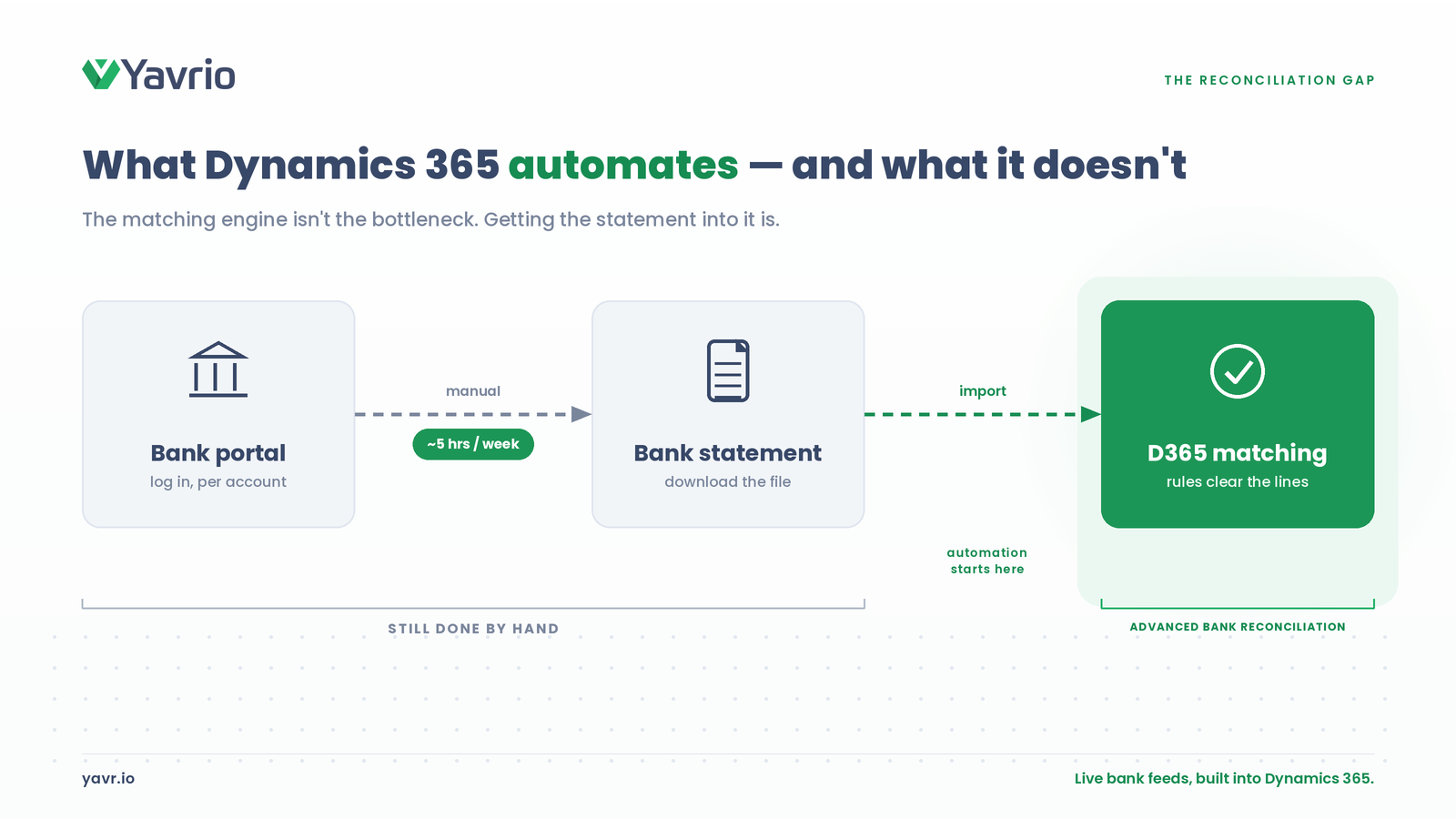
The catch is worth being direct about. ABR automates the matching. It does almost nothing about getting the statement in. The engine assumes a clean, correctly formatted file has already landed in the system. Somebody still has to produce that file.
So the manual labor never disappeared. It moved upstream, to the part of the process that doesn't show up in a demo. Someone logs into each bank, for each account, across each legal entity, retrieves the right file in the right format for the right date range, and imports it. When a team says reconciliation is automated, what they usually mean is that the second half is automated. The first half, the part that consumes the morning, is still a person and a browser.
Why The File Is The Real Problem
A bank statement file is a snapshot. It's accurate for the moment it was generated and stale immediately after. To work with it in Dynamics 365, that snapshot has to be fetched, named correctly, and pushed through an import process that expects a specific structure.
Now multiply that. Most mid-market and enterprise finance teams aren't reconciling one account at one bank. They're handling a dozen accounts across three or four banking relationships, sometimes in multiple currencies and multiple entities, each with its own portal, its own file format, and its own quirks. When one bank tweaks an export, or a file arrives missing a day, the import breaks and the morning gets longer. None of this is exotic. It's just friction that compounds quietly, and it's invisible until you map it.
The deeper issue is timing. Because the data arrives as a periodic file rather than a live feed, the picture in your ERP is always a little behind reality. You can't see today's position today. You see yesterday's, once someone has done the pull. For a function whose entire job is knowing where the cash is, that lag is the thing that quietly undermines everything else.
What It Costs
The cost shows up long before month-end. Finance teams spend five or more hours a week on manual bank reconciliation, matching lines and chasing the ones that don't, and that is just the weekly tax. The close itself is heavier. In a traditional setup, it runs between eight and ten business days and consumes 120 to 150 manual hours across the team, with error rates on manual transactions reported as high as 23 percent.
Fast closers are the exception. Research from Ledge finds only 18 percent of finance teams close their books in three days or less. Everyone else is still gathering and correcting data when they should be analyzing it.
Then there's rework. A single transposed digit creates a reconciliation discrepancy that takes 15 to 30 minutes to track down and fix, and manual processes generate those at a rate that automated flows simply don't. The hours add up in a way leadership rarely sees, because they're scattered across a hundred small corrections instead of one big line item. One analysis put the difference at over 1,500 hours a year reclaimed when a mid-sized firm moves from a ten-day close to a three-day one.
There's a human cost too, and it's the one that bites later. Pulling files and chasing variances is repetitive, low-autonomy work, and it's exactly the kind of work that pushes good people out. Turnover in data-heavy finance roles is high, and every departure costs months of recovery on a small team. You don't just lose hours to the manual process. You lose the person who knew how to run it.
And the strategic cost is the quietest of all. A controller working from a statement pulled two days ago is making cash decisions on a picture that's already wrong at the edges. The numbers reconcile. They're just late.
The fix is removing the file
The fix isn't a better import routine. It's removing the file from the equation entirely.
This is where Open Banking changes the shape of the problem. Instead of someone retrieving a statement and feeding it in, a live connection pulls transactions directly from the bank into Dynamics 365 over a secure API. There's no portal login, no format to wrangle, no download to schedule. The data flows in continuously, and the reconciliation engine you already paid for goes to work on transactions that are current rather than two days old. Live bank feeds built directly into the ERP close the gap that ABR was never designed to close.
The reconciliation logic doesn't get thrown away in this model. Automated reconciliation only delivers on its promise when the data behind it is fresh and complete, and a feed makes it both. Teams that have made this move report meaningfully shorter close cycles, not because matching got faster, but because the manual pull that used to start every reconciliation simply stopped existing.
Be realistic about the conditions, though. This works at scale only if the connectivity reaches the banks you use. The practical test is coverage: whether your specific banking relationships, across the countries and currencies you operate in, are reachable over a live connection. Get that right and the file problem disappears for good. Miss a key bank and you're back to a portal for that one account, which is exactly the kind of thing worth checking before you commit to anything.
Where To Start
If you run finance on Dynamics 365 and reconciliation still feels heavy, resist the urge to blame the matching rules first. Map where the hours go. In practice, the time isn't lost in matching at all. It's lost upstream, in the retrieval, the reformatting, and the exception-chasing that happens before ABR ever runs.
The real bottleneck in Dynamics 365 bank reconciliation is almost never the part Microsoft built to be automatic. That's the part worth fixing. Before changing anything, confirm your banks are covered by the connection you'd rely on, because that single fact decides how much of the manual pull disappears.
The question isn't whether Dynamics can automate reconciliation. It already does. The question is whether you're still hand-delivering the data it needs, and what that quiet, daily handoff is costing you across a year of closes. For most teams, that number is larger than they think, and it's hiding in plain sight on the first morning of every month.
