

.png)
How Money Moves When You Pay by Card
When you tap or insert your card at a checkout, the experience feels instant. A beep, a green tick, and you’re on your way. Behind the scenes however, a sophisticated chain of events unfolds in seconds, followed by a process to actually move the money.
We spend a lot of time explaining this to partners and customers because it affects how reconciliation works inside an ERP. This means occasionally we get to show what goes on under the bonnet (the hood, for our friends in North America).
I will give a real-world example: Let’s say I’m buying some Yavrio Gin (yes, we have it) for a G&T party.
Our head of UK Sales, Charlotte, happens to be the owner of this store.
Taking The Payment
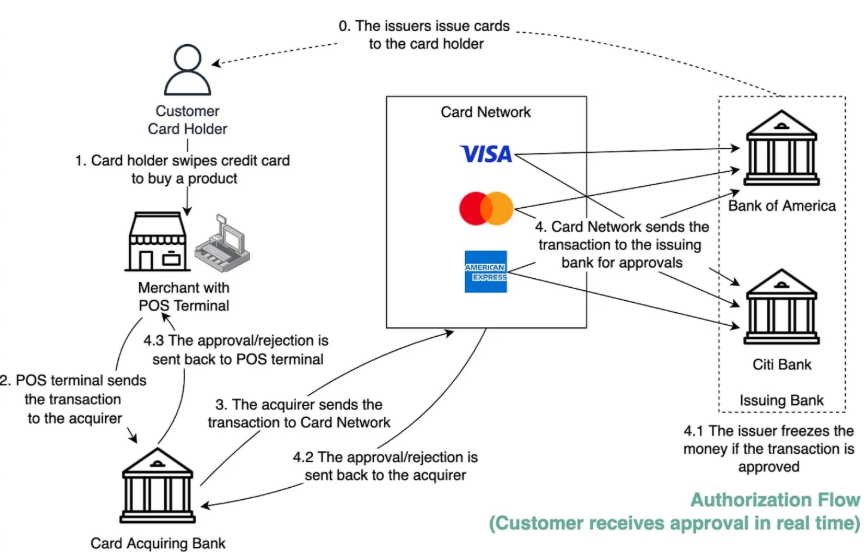
- The Tap: Starting the Signal
Everything begins when I tap, insert, or present my card at a card terminal or integrated EPOS system. At this stage, no money moves. Instead, the terminal sends a payment authorisation request containing the transaction amount, merchant details, and secure card data.
- From Terminal to Acquirer
The card terminal forwards the request to the acquiring bank, the institution that provides card acceptance services to the merchant. In some setups, an intermediary gateway or independent sales organisation may be involved, but the request ultimately reaches the acquirer.
- The Card Scheme Layer
The acquiring bank routes the request to the relevant card scheme, such as Visa, Mastercard, or American Express. The scheme acts as the messaging network that determines which issuing bank (my bank) must approve the transaction.
4+4.1. Issuing Bank Authorisation
The issuing bank checks whether the account exists, whether sufficient funds or credit are available, and whether the transaction appears legitimate. If approved, my bank reserves the funds rather than transferring them. This can sometimes explain why you see pending transactions and differences between available and current balances in your bank portal.
4.2+4.3. Approval Back to the Merchant
The approval message travels back through the scheme and acquirer to the terminal. The terminal displays an approval message, and Charlotte will hand me my gin. Whilst I’m preparing for the G&T party, no money has actually moved yet.
Batching and Capture
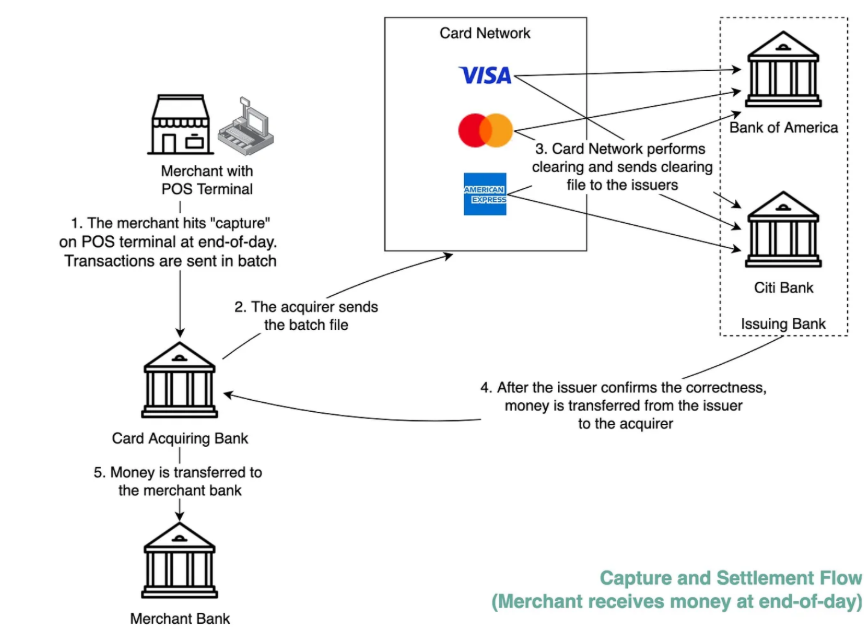
Throughout the day, approved transactions are stored in the terminal (Charlotte’s really good at selling gin, so there are a lot of transactions!).
- At the end of the day, Charlotte will batch these transactions, either manually or automatically. This step, often referred to as capture or a Z-report, prepares the transactions for settlement.
- The acquiring bank submits the batched transactions to the card schemes
- Issuing banks are instructed to release the reserved funds.
- The Issuing banks then transfer funds to the acquiring bank. Fees are applied at this stage, meaning settlement amounts are net of card fees.
Settlement timing varies. Next-day settlement is most common, faster settlement usually costs more, and weekly settlement is cheaper but slower.
- In some models, funds are paid directly into the merchant’s bank account. In others, funds first settle into a merchant account controlled by the acquiring bank and are later disbursed into the merchant’s bank account. This distinction explains why settlement and disbursement are related but different concepts.
Phil, why are you telling me this?
Understanding how money moves explains why card payments feel instant but settle later, why reconciliation is complex, and why control over transaction data is critical. This is also why finance teams often struggle with card reconciliation inside an ERP.
At Yavrio, we are looking at two different worlds: on one side, you have ERPs that have outdated banking systems out of the box. Conversely, we’re seeing strong fintech innovations which are geared towards consumers and small businesses.
When a business scales, those legacy processes start to break down. Ironically, that’s also the moment when innovation and security matters most. This entire process happens every time a customer taps a card.
For the customer, it’s a beep and a green tick.
For finance teams, it creates a chain of events that must eventually reconcile across sales entries, bank settlements, and processor fees.
That’s why understanding the payment flow matters.
If you don’t understand where the signals originate, reconciliation problems inside an ERP will always look like accounting issues when they’re actually payment infrastructure issues.
